Today: the daily briefing
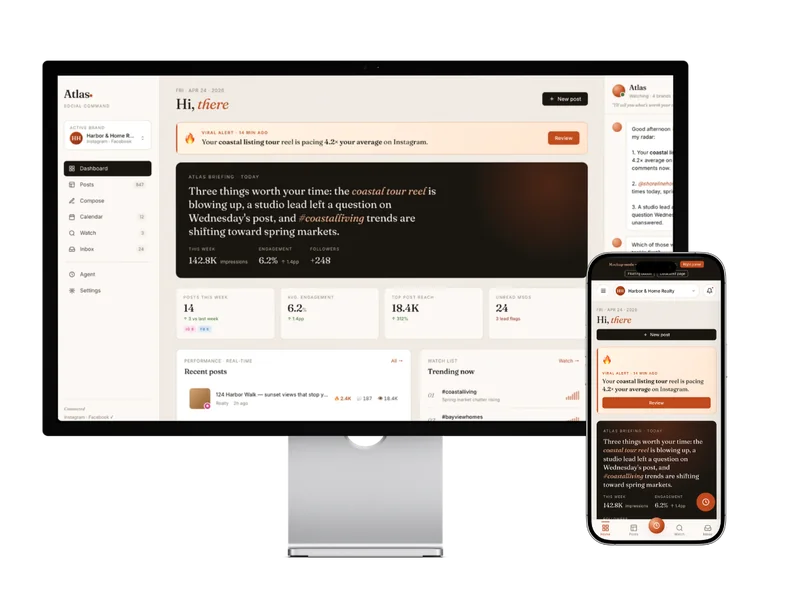
Opens with a personalized Atlas briefing: what is working, what needs attention, which post is taking off. Performance KPIs at a glance.
A paused social media dashboard prototype. Work stopped when connecting the different social platforms proved too complex to continue with this project.
Custom social media prototype
Status: Paused
Jane manages social media for multiple real estate brands across Instagram, Facebook, and other platforms. She is not a social media manager at an agency with a team behind her. She is a working realtor doing her own content, tracking her own performance, and making her own decisions about what to post next.
The enterprise social media tools are designed for teams and agencies. They surface a lot of data, require significant configuration, and assume you have time to sit with dashboards. Jane does not. She needs to open something in the morning, understand what is working and what needs attention, and get on with her day.
She had watched me use AI agents for my own work and wanted something that felt like that: attentive, helpful, oriented toward her, not toward a generic use case.
The temptation with a tool like this is to keep adding: scheduling, post composition, inbox management, DMs, analytics exports, calendar views. Every feature is individually justifiable, and the result is a tool that does everything and serves no one particularly well.
The explicit brief for v1: do not build Sprout Social. Do not build Buffer. Do not build a full agent operating system. Build a small private app with an assistant layer. Atlas, the AI assistant layer, is read-only in v1. It watches, summarizes, and advises. It does not post, schedule, reply, or take action on Jane’s behalf.
| Scope | Details |
|---|---|
| In v1 | Performance briefing, post intelligence, Atlas AI interpretation, trending signals, connections overview |
| Not in v1 | Posting, scheduling, inbox, DMs, calendar management, push notifications, persistent Atlas memory, Meta OAuth |
The Atlas briefing on the Today page is the core product moment. It surfaces three things worth Jane’s time each day: specific, actionable, prioritized. Generic dashboards tell you what happened. Atlas tells you what it means and what to look at next.
Opens with a personalized Atlas briefing: what is working, what needs attention, which post is taking off. Performance KPIs at a glance.
Recent posts with per-post metrics: likes, comments, reach, platform. Organized for quick scanning.
A conversational interface for asking questions about performance, getting caption ideas, or understanding why something worked.
An overview of the social accounts connected to the dashboard: which platforms, which brands, current status.
The dashboard is fully responsive, but the design starts from mobile. Jane is not sitting at a desktop to check her social performance. She is looking at her phone between client calls.
Bottom navigation on mobile, sidebar on desktop. Page transitions are state-based rather than route-based, which keeps navigation instant. The Today page is the default landing.
The viral alert component surfaces when a post is significantly outpacing normal performance, which is the kind of time-sensitive signal that gets buried in a standard analytics dashboard.
The current v1 is a UI shell running on mocked data: real component architecture, real design, real interactions, but not yet wired to live Meta API data. Getting the UX right first means the integration work does not pull the design in wrong directions.
React 18 with TypeScript, built with Vite for fast iteration. The API layer is a lightweight Fastify server, appropriate for a private tool where you do not need a full framework. The monorepo structure keeps frontend and API in a single npm workspace.
State-based navigation rather than a full router, because for a tool with four primary views and one user, the added complexity of client-side routing is not worth it.
The API scaffolding is in place for real Meta data integration. Atlas’s conversational layer will connect to an LLM API when the data is live. Persistent Atlas memory is a planned v2 feature once the data layer is solid.
Custom tools for specialists are a different design problem than general-purpose software. When you are building for one person with a specific workflow, you can optimize for exactly how that person works, not how a persona document says they might work.
The interesting constraint in Florey Social was keeping Atlas in interpretation mode rather than action mode. Most AI tool design conversation right now is about agents that do things. This is about an agent that understands things and explains them to someone who then decides what to do.
If you work with specialists who have performance data they are not fully using because the tools do not fit how they think, that is the problem I'd enjoy solving with you.
If you are building something that needs domain judgment, careful systems thinking, or practical AI support, send me a note.